
Unbrick a BOOX · stuck on logo · bootloop
BOOX stuck on the logo? Let's bring it back.
If your BOOX Note Max hangs on the ONYX logo, keeps restarting, or shows nothing at all after a boot flash, it can almost always be rescued. You need a deep-flash cable, a computer with a USB-A port, and the backup of your tablet's startup software.
Breathe first
Don't panic: a black screen or a logo hang is almost always a soft brick
A BOOX stuck on the logo or in a bootloop usually means one thing went wrong: the tablet's startup software (the boot partition) is damaged or doesn't pass its checks. Your notes, books and the rest of the system are still there.
The Note Max has a rescue door built into its Qualcomm chip, called EDL (Emergency Download mode). It works even when the screen stays black. Through it, you write a good copy of the startup software back, and the tablet starts again.
A blank screen during the rescue is normal. So is a screen that still shows the last thing it displayed: e-ink keeps its picture even when the tablet is off or in rescue mode. Take your time — nothing here is a race.
Three things
What you need
-
A deep-flash (EDL) cable
A USB cable with a small button on it that pushes the tablet into EDL. Search for “Qualcomm deep flash cable” or “EDL cable”; they cost a few dollars. A normal charging cable won't do it.
-
A real USB-A port
Plug the cable's USB-A end straight into a computer's own USB-A port. USB-C adapters and dongles usually don't work for this.
-
Your boot backup
The safety copy of your tablet's startup software — the one Inkroot made before rooting, or your own
bootimage backup.
The easy way
With the Inkroot app
Open Inkroot and pick Rescue. It finds your safety copy, walks you through the cable one step at a time, waits until it sees the tablet, writes the copy back and checks it before restarting.
Tested on real hardware. Inkroot has been tested end-to-end on a real Note Max (firmware 4.2) on macOS, Windows and Linux. Keep your safety copy somewhere safe all the same.
- Recommended for this computerMacApple SiliconDownload
- Recommended for this computerMacIntelDownload
- Recommended for this computerWindows10/11, 64-bitDownload
- Recommended for this computerLinuxx86_64 AppImageDownload
Latest release:
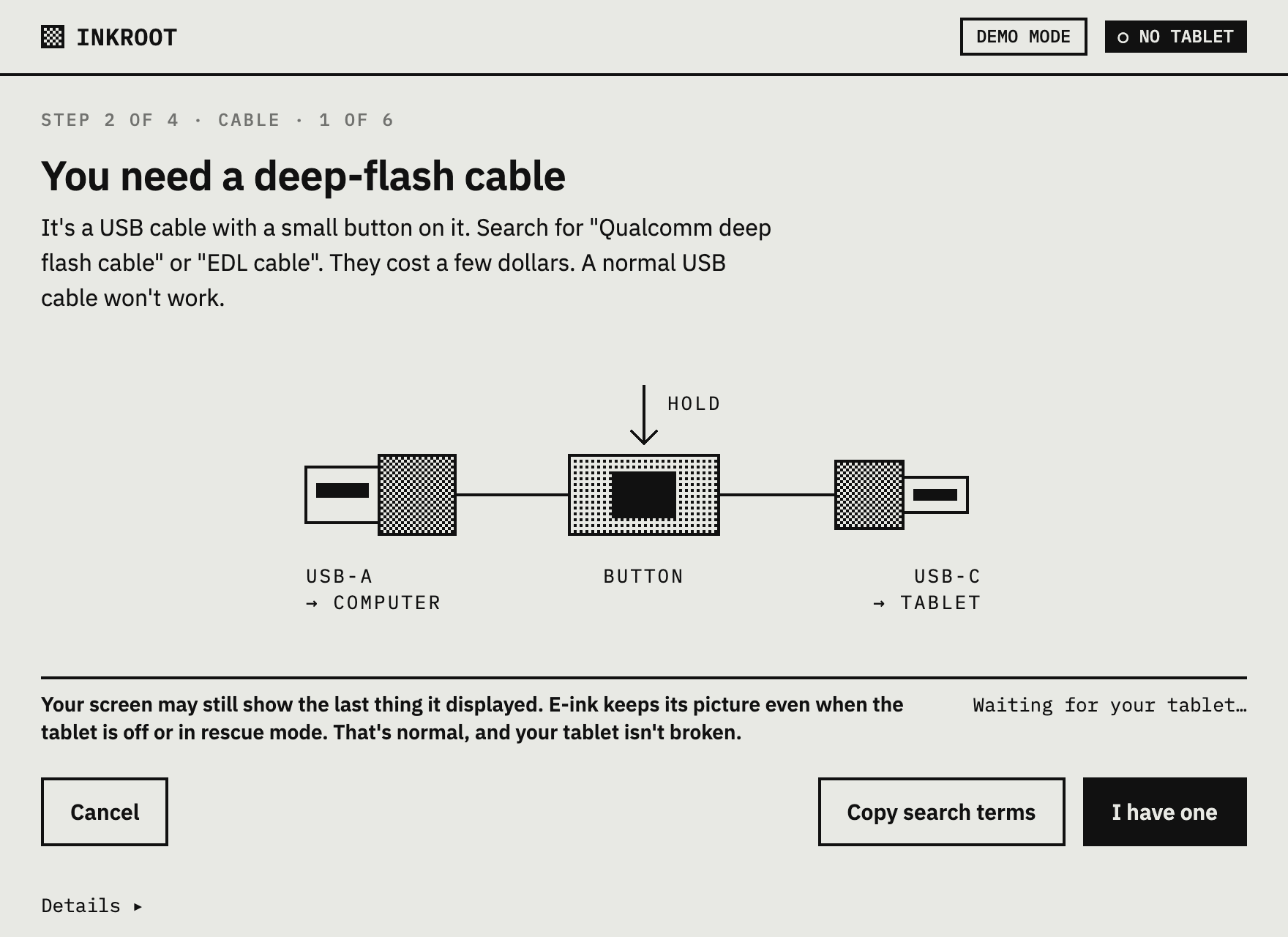
Into EDL mode · BOOX EDL
The cable steps
Plug the cable's USB-A end into your computer first. Then:
- Hold the button on the cable, and keep holding it.
- Plug the cable into the tablet (USB-C end).
- Hold the tablet's power button for about 15 seconds. The screen might not change.
- Keep the cable button held about 10 seconds more.
- Release. Let go of the button and don't touch it again until Inkroot says it's done — pressing it during the transfer interrupts the connection. The tablet is now in EDL. Your screen may still show the last thing it displayed, because e-ink keeps its picture even when the tablet is off or in rescue mode. That's normal.
A plain restart with the power button doesn't reach EDL on the Note Max, and the volume-key combinations didn't either. The cable is the reliable way in. If the computer doesn't see the tablet, try another USB-A port and hold the buttons a little longer.
No USB-A port?
Many newer laptops only have USB-C, and adapters usually drop the signal the cable needs. Borrow a computer that has a real USB-A port — a desktop, or an older laptop — and run Inkroot there. That's exactly why there are Windows and Linux builds as well as Mac.
Backing up or rooting a tablet that still starts doesn't need any of this: a normal USB-C cable works, even straight into a Mac.
No backup?
That isn't supported yet. Rescue writes back a copy of your tablet's startup software, and Inkroot never hosts or downloads firmware. If you don't have a backup, please open an issue with your tablet's details, so we know it's needed.
Manual way
Prefer a terminal? The manual EDL un-brick guide covers the same rescue by hand with the open-source bkerler/edl client: the exact cable, the loader, and the commands to write boot back.
Unbrick BOOX questions
Questions
Why is my BOOX stuck on the logo?
Almost always because its startup software (the boot partition) is damaged or no longer passes the tablet's checks — for example after a root attempt went wrong or a write was cut off. That's a soft brick: the rest of the tablet is fine, and writing a good copy of boot back over Qualcomm EDL brings it back.
Can I unbrick a BOOX without a backup?
Not with Inkroot yet. Rescue writes back a copy of your own tablet's startup software, and Inkroot never hosts or downloads firmware. If you don't have a backup, please open an issue with your tablet's details.
Which cable do I need to unbrick a BOOX?
A Qualcomm deep-flash (EDL) cable: a USB cable with a small button that pushes the tablet into EDL. Search for “Qualcomm deep flash cable” or “EDL cable”. A normal charging cable won't work. Plug its USB-A end into a real USB-A port; USB-C adapters usually don't work.